Compare three homes using the same evidence
Compare three Costa del Sol homes with a browser-based workspace for costs, observations, claims, checked records and next questions. Save, export or print.
At a glance
- Compare missing costs as unknown rather than assuming they are zero.
- Keep observations, reported claims and supporting checks separate.
- Save in this browser, export JSON or print a private comparison.
Shortlisting homes on the Costa del Sol becomes easier when the same questions are asked of every property. A terrace view, asking price or attractive photograph can dominate the conversation while an awkward approach, uncertain running cost or unanswered document question receives less attention. This comparison workspace keeps the practical differences visible without awarding a home a misleading overall score.
Use the three-home tool on this page, or download the blank comparison worksheet. The tool processes entries in your browser and does not submit them to this website. Saving is optional. Use nicknames rather than full addresses, and keep personal, bank and security information out of your notes.
Start with a comparable shortlist
Give each home a short reference such as Apartment A, Village B or Villa C. Record the visit date and your intended use. A home suited to occasional visits may need a different comparison from one intended for year-round living. If the shortlist mixes these purposes, write that down before interpreting the cost totals.
Use the property-type comparison guide to establish the differences between the actual homes. The tool does not decide whether an apartment, country property or villa is better. It provides the same headings so that differences in cost, access, comfort and evidence can be discussed on a consistent basis.
Separate observations, statements and checked information
The tool gives you separate spaces for what you observed, what you were told and what an appropriate adviser or supporting record has checked. These are different kinds of information. “I saw a parking space” does not establish the arrangement under which you could use it. “The seller says the extension is documented” is a question for the relevant checks.
Keep a date and source with important entries. The listing decoder helps turn claims into questions, while the document examples show why different records serve different purposes. Avoid moving an entry into the checked section merely because it has been repeated by several people.
Use complete and consistent cost inputs
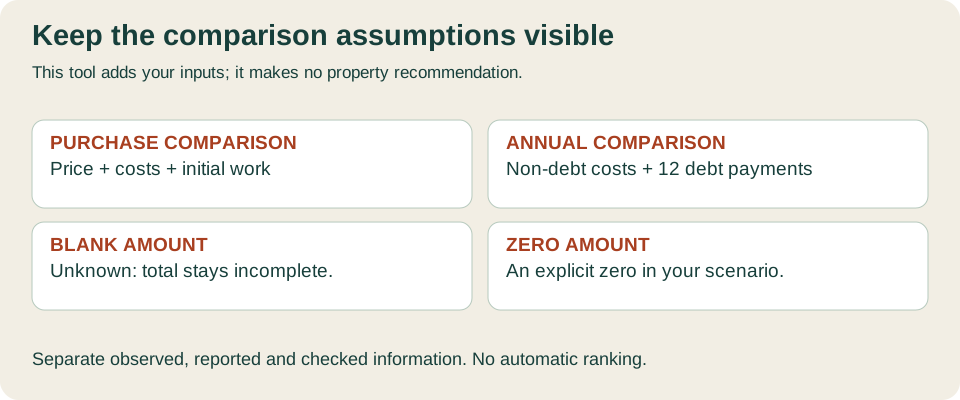
Enter the proposed price, your estimate of purchase costs and planned initial work separately. Use the buying cost calculator to organise the transaction assumptions, then check them for your circumstances. Use quotations or clearly labelled assumptions for work, including the items that are outside the current scope of a quotation.
The first tool total adds those three numbers. It is a comparison of price, purchase costs and initial work before financing. It is not the cash you must provide, a mortgage offer or a tax assessment. If borrowing is involved, keep the financing plan and its outstanding conditions alongside this comparison rather than deducting a hoped-for loan from an incomplete budget.
Leave an unknown amount blank
A blank entry means you have not supplied that amount. Zero means you deliberately entered zero. The tool keeps that distinction: it will not produce a complete acquisition total if one of its three inputs is missing. This prevents a property with unknown costs from appearing less expensive simply because those fields have not been completed.
The same principle applies to annual spending. Enter a total estimate for annual ownership expenditure excluding debt, plus a separate monthly debt-payment assumption where relevant. Enter zero debt deliberately for a scenario without it. The tool adds twelve monthly debt payments to the annual non-debt estimate only when both inputs are present. No future increases or interest-rate movements are predicted.
Try a clearly fictional arithmetic example
Suppose Home A has an assumed price of €300,000, purchase costs of €30,000 and initial work of €10,000. The total before financing is €340,000. If Home B uses €290,000, €29,000 and €25,000, its equivalent total is €344,000. Home B’s lower assumed price has not produced the smaller total in this particular example.
These figures are invented inputs, not current asking prices, tax rates or quotations. If Home C has a price but no checked work estimate, leave that estimate blank. The resulting “Incomplete” label identifies a question to resolve. It does not suggest that Home C is unsuitable or that the cost will be zero.
Bring the annual budget into the decision
Use the ownership budget calculator to assemble the non-debt estimate. Keep community charges, utilities, insurance, maintenance, management and relevant personal circumstances in view. Check what is included in the figure you transfer so that a mortgage payment or one-off project is not counted twice.
For example, annual non-debt spending of €5,000 and an assumed monthly debt payment of €800 produce €14,600 in the tool’s combined annual figure. This is arithmetic on your entries, not an affordability decision. Use the mortgage affordability guidance and appropriate advice for the wider household position.
Compare the ordinary routine at each address
Record the complete approach from parking or public transport to the entrance. Include steps, gradients, deliveries and the routes you would use for shopping, appointments or work. A municipality name or a short journey estimate cannot establish the routine at every address. Visit at times relevant to the household and keep the observations attached to the actual candidate.
The area comparison checklist and year-round viewing guide help you describe those differences. Notes such as “walked the return route with shopping” or “need to test the evening journey” are more useful than an unexplained location score.
Keep condition and shared obligations visible
Summarise the questions arising from the home, its services and any shared building. Record whether a suitable inspection has taken place and what its scope excluded. A report on one property does not automatically cover the same matters as a report on another. Ask for clarification before treating the two as equivalent evidence.
Use the inspection guidance and community assessment to prepare the enquiries. Keep proposed work, outstanding records and possible shared expenditure in the open-questions field until the relevant person has supplied an explanation for your transaction.
Save, export and print deliberately
Select Save in this browser if you want a copy in this browser’s local storage. This is a local copy, not a website account or a synchronised backup. Another person using the same browser profile may be able to open it. Private browsing, clearing site data or using a different device can affect its availability.
Download the JSON file if you need a portable copy, and load that file into the tool when required. Keep the file private. Print comparison produces a summary suitable for discussion with your household or advisers. Clear entries removes this tool’s saved copy and current entries; an Undo option is available during the same page session until you make another change.
Finish with the next useful question
After comparing the homes, choose the unanswered questions that could change your shortlist. Allocate a responsible person and a next action. If a valuation, survey, document or funding assumption changes, revisit the entry using the purchase decision guides. Keep earlier notes where they explain how the decision developed.
For British buyers, the UK government’s Spain property guidance provides background on independent legal advice. It does not decide an individual purchase, and neither does this tool. The guidance and arithmetic examples were prepared on 9 November 2026. No independent professional review or real transaction outcome is claimed.
Before sharing a printed summary, review the notes and remove information the recipient does not need. A household comparison and a brief for a professional may contain different levels of detail. Keep the original supporting records in your own organised folder, with the relevant question and date, instead of expecting a short comparison cell to replace the complete material.